
Welcome to the upgraded NEXUS website. Use the headings below as links to expand or close relevant sections.
If you ordered a download and used the guest checkout, you will receive an email with a link to the download. Please also check your spam/junk folder.
If you logged in to your account and ordered a download, it will appear in MY ACCOUNT when logged in, under the tab “Downloads” and you will have three attempts to download the article/magazine/eBook.
If you cannot remember your password or get access to your account, please follow this link to reset.
If you have attempted to use our payment gateway to pay with a credit card and your transaction was unsuccessful but your card has no known issues, please use the PayPal option to “pay as a guest” to use your credit card. No PayPal account is necessary but this bypasses any restrictions credit card providers may have imposed when ordering outside your region, as PayPal is recognised internationally.
Also please ensure your browser is up to date so you can see all payment buttons etc. If the problem persists, please try another browser.
If you are viewing any of our pdf back issues on an iOS device such as an iPad or iPhone and there are missing images, this is a current iOS issue which can be rectified by using the free Adobe Reader app available on the App Store by following this link.
When ordering on our website outside of Australia, purchases may be subject to import duty in your country. Currently the value of the Australian dollar against many currencies such as the pound, US dollar and euro still makes this worthwhile. If a package is refused and returned to us, the purchaser remains liable for postage costs.
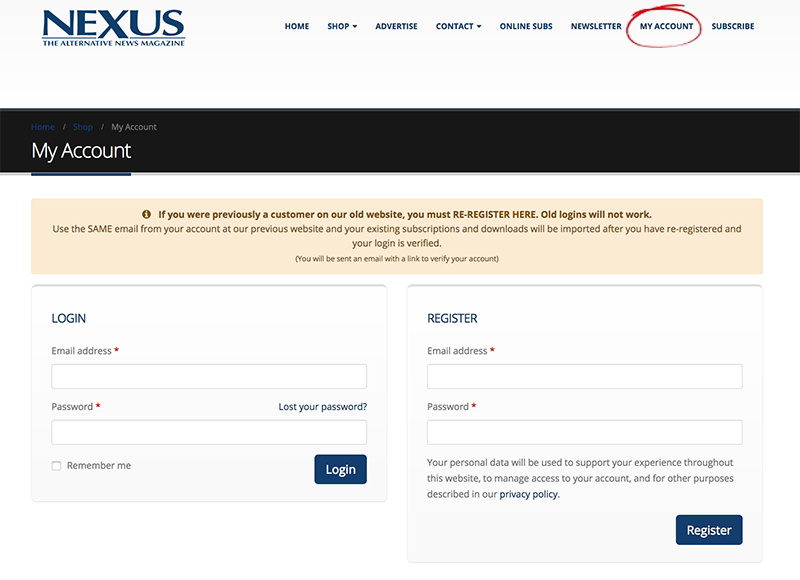
If you have arrived here and can’t log in with your account details from our previous website, you need to re-register. This is a simple process. Please go to the My Account tab on the menu and fill in the details under the right-hand “REGISTER” option.
If you have an online/digital subscription to access, re-registering is a three-step process.
STEP ONE
Click/tap on the “My Account” menu tab at www.nexusmagazine.com (pictured below)
STEP TWO
You must re-register
Fill in the email address under the REGISTER option on the right-hand side of the page and create a new password (just type it into the “Password” field). Once your account is created, you will be forwarded an email with a link which you will need to follow to verify your account.
STEP THREE
Check your email and follow the instructions (if you can’t see the email in your inbox, please check your spam folder).
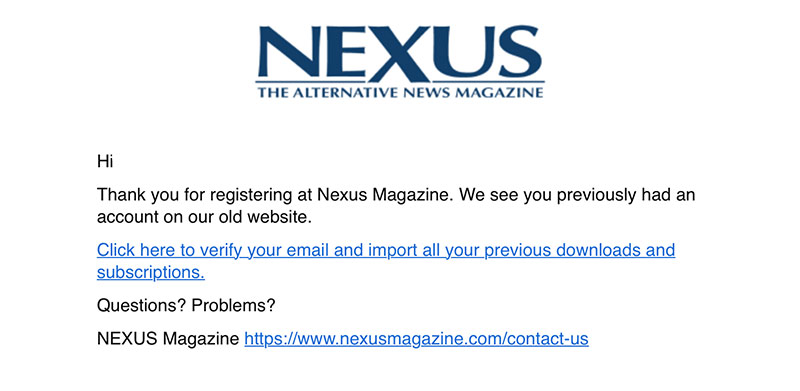
The email you will receive is pictured above.
Click on the link in the email to verify your account and import your subscription/downloads.
If you have an online/digital subscription, you can log in via the ONLINE SUBS link on the top menu of the website or log in and navigate to your account and click/tap on “My Subscription” under My Account.
The online subscription is also a complimentary add-on exclusively when you purchase a subscription via our website (for the same duration as your hard copy subscription).